


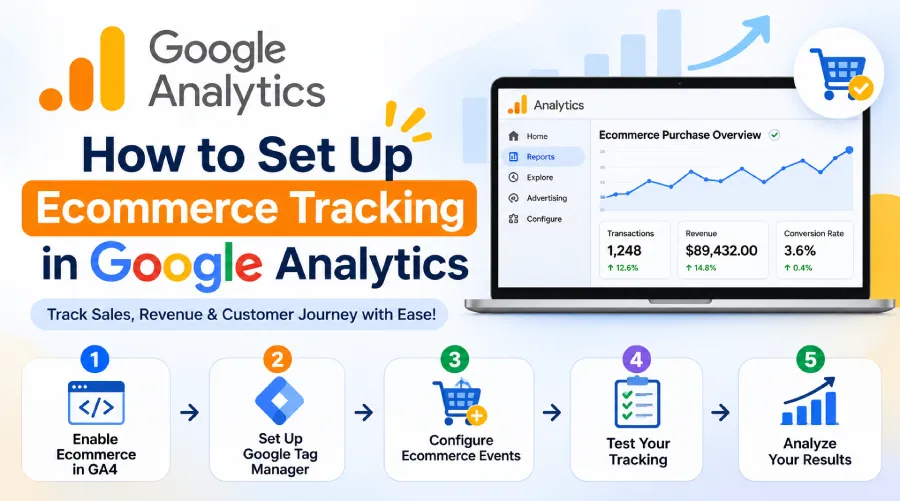
In today’s competitive online marketplace, understanding customer behaviour is essential for growing an ecommerce business. Google Analytics helps businesses track website visitors, monitor product performance, measure sales, and understand customer purchasing journeys. The businesses can identify which products generate more revenue and which marketing strategies deliver better results with accurate ecommerce tracking. A professional eCommerce Company In Jaipur can help businesses implement effective analytics strategies to improve their online performance. Whether you run a small online store or a large ecommerce platform, setting up ecommerce tracking in Google Analytics allows you to make data-driven decisions and increase sales opportunities.
1. Understand Ecommerce Tracking in Google Analytics
Ecommerce tracking in Google Analytics 4 (GA4) helps businesses monitor customer interactions throughout the shopping journey.
It tracks important activities such as:
-
Product views
-
Add-to-cart actions
-
Checkout initiation
-
Payment completion
-
Purchase transactions
-
Total revenue
-
Product performance
These insights help businesses understand how customers interact with their online stores and identify opportunities to improve conversions.
2. Create a Google Analytics 4 Account
The first step is creating a Google Analytics 4 property for your ecommerce website.
Follow these steps:
-
Visit the Google Analytics website.
-
Sign in using your Google account.
-
Click on the Admin section.
-
Select Create Property.
-
Enter your website or business name.
-
Choose your reporting time zone and currency.
-
Select Web as your data collection platform.
-
Enter your website URL and create a data stream.
After completing these steps, Google Analytics will provide a Measurement ID that you can use to connect your website with GA4.
3. Install Google Analytics on Your Ecommerce Website
After creating your GA4 property, you need to connect it to your ecommerce website.
You can install Google Analytics using Google Tag Manager or directly through the Google tag.
Google Tag Manager is useful because it allows you to manage tracking codes without repeatedly editing website code.
A professional Website Company In Jaipur can help integrate Google Analytics correctly and ensure that important ecommerce events are tracked properly.
The validate your tracking setup does not create duplicate events, as incorrect implementation can affect reporting accuracy.
4. Enable Ecommerce Events in Google Analytics
GA4 uses ecommerce events to track customer activities and purchases. Some important recommended ecommerce events include:
|
Event Name |
Purpose |
|---|---|
|
view_item |
Tracks product views |
|
add_to_cart |
Tracks products added to cart |
|
view_cart |
Tracks cart visits |
|
begin_checkout |
Tracks checkout initiation |
|
add_payment_info |
Tracks payment information |
|
purchase |
Tracks completed orders |
|
refund |
Tracks refunded transactions |
Your website or ecommerce platform needs to send these events with the correct parameters.
For example, the purchase event should include transaction ID, currency, value, and product information.
This helps Google Analytics generate accurate ecommerce reports.
5. Configure Product and Purchase Data
While tracking ecommerce events alone is not enough. You should also configure product-level information to understand which items perform best.
Important parameters include:
-
Item ID
-
Item name
-
Item category
-
Item price
-
Quantity
-
Currency
-
Transaction ID
-
Purchase value
These parameters help businesses analyse product sales, revenue, and customer preferences.
A eCommerce account management services can help maintain organized product information and improve overall ecommerce operations for businesses managing multiple online marketplaces.
6. Set Up Ecommerce Tracking with Google Tag Manager
Google Tag Manager makes ecommerce tracking more flexible and manageable.
Here is how you can configure it:
-
Create a Google Tag Manager account.
-
Connect your website using the GTM container code.
-
Configure your GA4 Google tag.
-
Set up triggers for ecommerce events.
-
Create event tags for product views, cart activities, and purchases.
-
Configure event parameters using your website’s data layer.
-
Preview and test your tags.
-
Publish the container after successful testing.
A properly configured data layer is important because it transfers product and transaction information to Google Tag Manager for dynamic ecommerce websites.
7. Test Your Ecommerce Tracking Setup
Before relying on your analytics reports, always test your tracking implementation.
Google Analytics provides DebugView and Realtime reports to help verify incoming events.
You should perform a test purchase and check whether:
-
Product view events are recorded.
-
Add-to-cart events are triggered.
-
Checkout events appear correctly.
-
Purchase values are accurate.
-
Transaction IDs are captured.
-
Duplicate purchase events are avoided.
The testing helps identify tracking errors before they affect your business decisions.
8. Analyse Ecommerce Reports and Improve Performance
Once tracking is working correctly, you can use GA4 reports to understand your ecommerce performance.
The monitor metrics such as total revenue, purchases, average purchase revenue, product performance, and customer acquisition.
The businesses selling through marketplaces can also benefit from specialized management strategies.
For example, amazon account management services help sellers manage their marketplace operations and monitor business performance.
Similarly, flipkart account management services can support product listing management, sales monitoring, and marketplace growth.
The businesses selling through social commerce platforms can use meesho account management services to improve catalogue management and monitor their online selling activities.
A greater awareness of overall business performance can be obtained by combining website analytics with marketplace information.
Conclusion
A knowledge consumer behavior, tracking sales, and enhancing online business performance all depend on setting up ecommerce tracking in Google Analytics. The entire process helps companies in making more informed choices from configuring GA4 events to tracking product information and analysing purchase reports. Also, accurate analytics aid in finding sales possibilities and enhancing client satisfaction. The businesses looking to strengthen their digital presence can explore professional solutions from Novel Web to improve website performance, ecommerce tracking, and online growth. The business can use useful data to make better marketing decisions and achieve long-term success with the correct tracking strategy.

